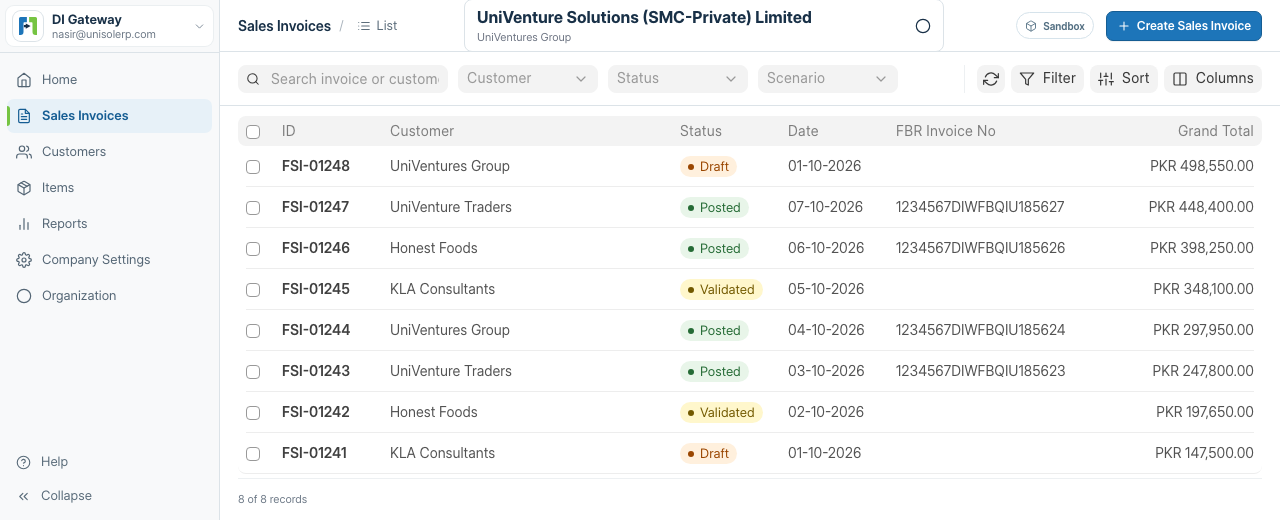
FBR Digital Invoicing integration for Pakistan

Manage and transmit your digital sales invoices to FBR.

DI Gateway is focused invoicing software for sales-tax-registered businesses that do not already have an FBR-integrated POS, ERP, or invoicing system. Create, validate, submit, and track digital invoices from one workspace.
No full ERP requiredFBR validation and submissionFor accountants and businesses
Sales InvoiceValidated
INV-00042
CustomerRegistered buyer
ScenarioApplicable case
Tax templateStandard rate
StatusValidated
✓ Invoice validated. Ready for FBR submission.
The business requirement

Digital invoicing is now an operating requirement—not just a file format.

FBR's current legal framework requires covered sales-tax-registered persons to integrate their invoicing systems and issue digital sales invoices for real-time transmission. DI Gateway gives businesses without suitable integrated software a practical, focused way to manage that workflow.
Read FBR's Digital Invoicing legal provisions →
Requirements depend on the current law and a taxpayer's registration/status. Confirm applicability from official FBR material or professional advice.
A focused alternative

No FBR-integrated invoicing system? Start here.

You should not need to adopt a full accounting suite just to prepare and transmit compliant sales invoice data. DI Gateway provides the invoice records, checks, submission controls, responses, and history needed for FBR Digital Invoicing while remaining a standalone service.
01

Prepare the invoice data

Maintain company, buyer, item, HS Code, UOM, tax, and price data in one operational workspace.
02

Validate and transmit

Check invoices before deliberate submission through the active FBR environment.
03

Follow every result

Read validation guidance, correct failures, retry safely, and retain a traceable activity history.
Built around the people doing the work

One FBR workflow, two practical starting points.

CA

For accountants

Standardize client onboarding, invoice preparation, scenario checks, and submission follow-up without turning the process into a spreadsheet maze.
Explore the accountant workflow →
SM

For small businesses

Set up your company, customers, items, tax details, and invoices in a guided interface designed for day-to-day use.
Explore the business workflow →
A guided path

From setup to compliant operations.

01

Configure your company

Capture the legal and business details needed for invoice preparation.
02

Prepare invoice masters

Keep customers, items, HS codes, UOMs, and tax choices ready for use.
03

Create and validate invoices

Apply the correct customer, item, tax, scenario, and pricing data before submission.
04

Submit and track the FBR result

Post through the active environment, handle guidance, and preserve the activity history.
Core product

The essentials for FBR Digital Invoicing.

01

Company setup

Business identity, registration details, address, province, and secure environment credentials.
02

Customers and items

Registered and unregistered buyers, HS codes, UOMs, and reusable master data.
03

FBR validation and submission

Validate first, submit deliberately, and keep the FBR result attached to the invoice workflow.
04

Invoice validation

Separate validation and posting actions with readable correction guidance.
05

Submission history

Trace what happened, when it happened, and what needs attention next.
06

Operational control

Lock successful invoices, retry correctable failures, and keep technical credentials out of normal user views.
Clear answers

Frequently asked questions.

Is DI Gateway an FBR product?
No. DI Gateway is independent software. It is not affiliated with or endorsed by FBR.
Who needs FBR Digital Invoicing?
FBR's current framework covers sales-tax-registered persons required to integrate and issue digital invoices. Exact applicability can depend on the current legal instrument and the taxpayer's status, so businesses should verify their position from official FBR material or professional advice.
What if my business has no FBR-integrated POS, ERP, or invoicing software?
That is the primary problem DI Gateway is designed to solve. It provides a focused standalone workspace for the business records, invoice preparation, validation, submission, responses, and history needed for FBR Digital Invoicing without requiring a full accounting system.
What work can I do in DI Gateway?
Configure company data, maintain customers and items, prepare sales invoices, validate payloads, submit them to FBR, review readable guidance, retry correctable failures, and follow the activity history.
How does Sandbox qualification fit?
Sandbox is the onboarding and qualification stage used to prove the scenarios applicable to a taxpayer's business nature and sector before Production-token activation. It prepares the business for live operation; it is not the product's identity.
Does DI Gateway guarantee compliance or FBR acceptance?
No. DI Gateway helps prepare, validate, transmit, and track digital invoices, but each business remains responsible for accurate tax and invoice data, professional advice where needed, and its current FBR obligations. FBR controls its own validation rules, systems, and acceptance decisions.

Put your FBR invoice workflow in one place.

Create your account, configure your company and master data, then prepare your first validated FBR sales invoice.
Start FBR setup